Relational Query Superpowers
See how Honeycomb's relational query keywords—root, parent, child, any, any2, any3, and none—let you pull attributes from anywhere in a single trace into one query, walked through with a real checkout-error investigation.

By: Ken Rimple

Relational Fields: Query Even More Relationships in Your Traces
Earlier this year, we introduced relational fields. Relational fields enable you to query spans based on their relationship to one other within a trace, rather than only in isolation. We’ve now expanded this feature…
Read More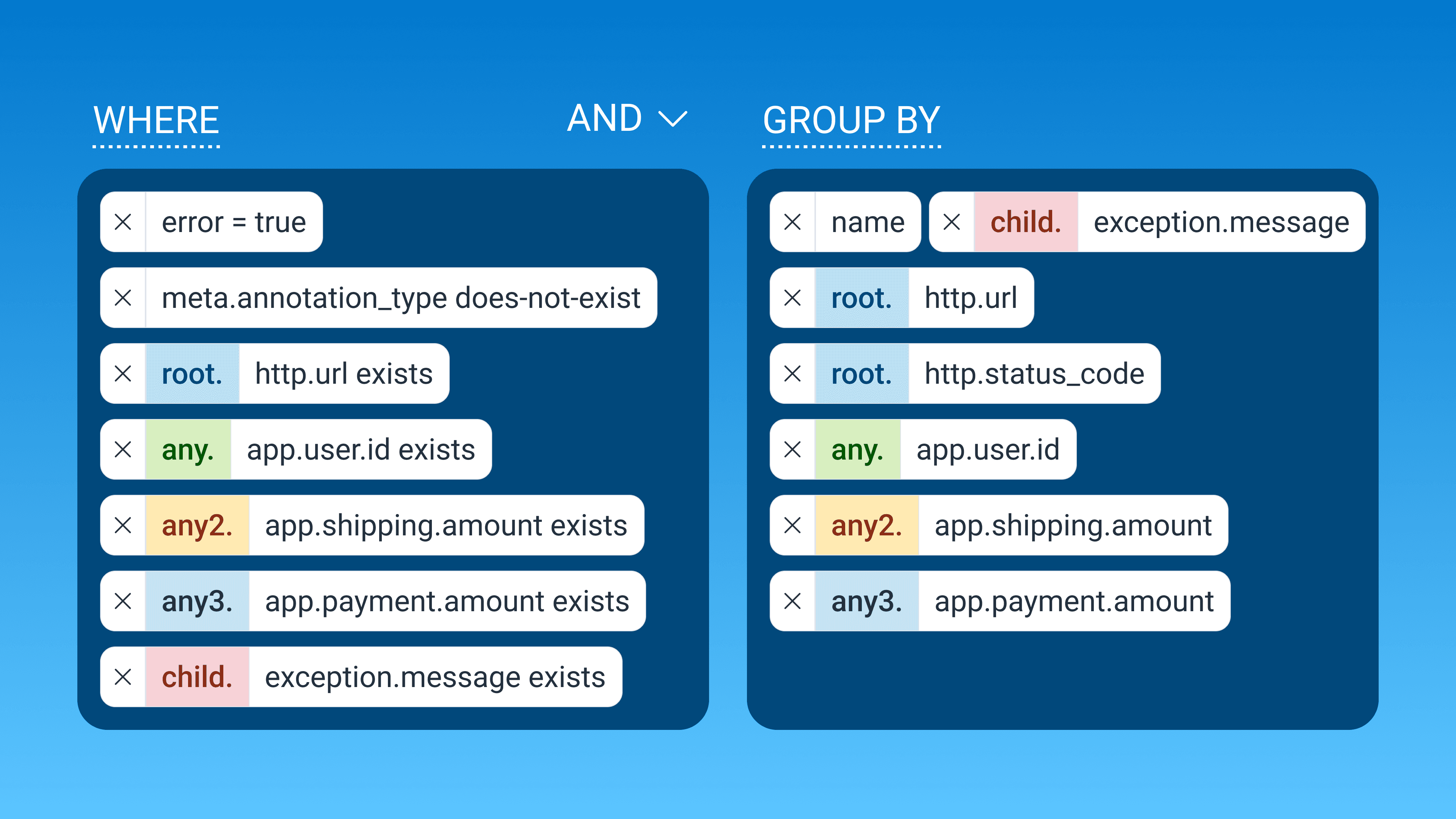
I'm investigating repeated errors in my e-commerce application, and I need to get enough context in a single Honeycomb query to piece the entire picture together. Each query returns events based on the event's WHERE clauses, but I want to know several things from outside of the event that recorded an error. Things like:
- the URL involved
- the exception details
- the user's email address to contact them for support
- the shipping costs
- the amount of money the user spent
Those attributes are all over the trace. That's going to make a single query tough, right?
Wrong!
But, once I start applying relational queries to this challenge, I can grab information all over the trace and make it visible to the team—and my manager, who wanted to be informed on business-impacting errors.
See relational queries in action in the below video.
What is a relational query?
Honeycomb relational queries let you add criteria and groupings not only to target specific trace spans, but to their parent, children, and any other trace-involved spans as well. This can be incredibly useful in groupings, filterings, and queries in boards, triggers, and SLOs. Relational queries are implemented by attributes prefixed by the following keywords: root, parent, child, any, any2, and any3.
For additional information on relational fields in queries, head over to the relational fields page.
Let's start with the error spans in the checkout service
My manager asked me to focus on errors related to checkout, so I'll start there. The errors are the events we care about. I'll make my query dataset the checkout service, and add error = true to the WHERE conditions. I'll GROUP BY name to see what spans are tripping the error status, since all spans have a name property.

This shows several span names with errors originating from the checkout service in the past 24 hours:
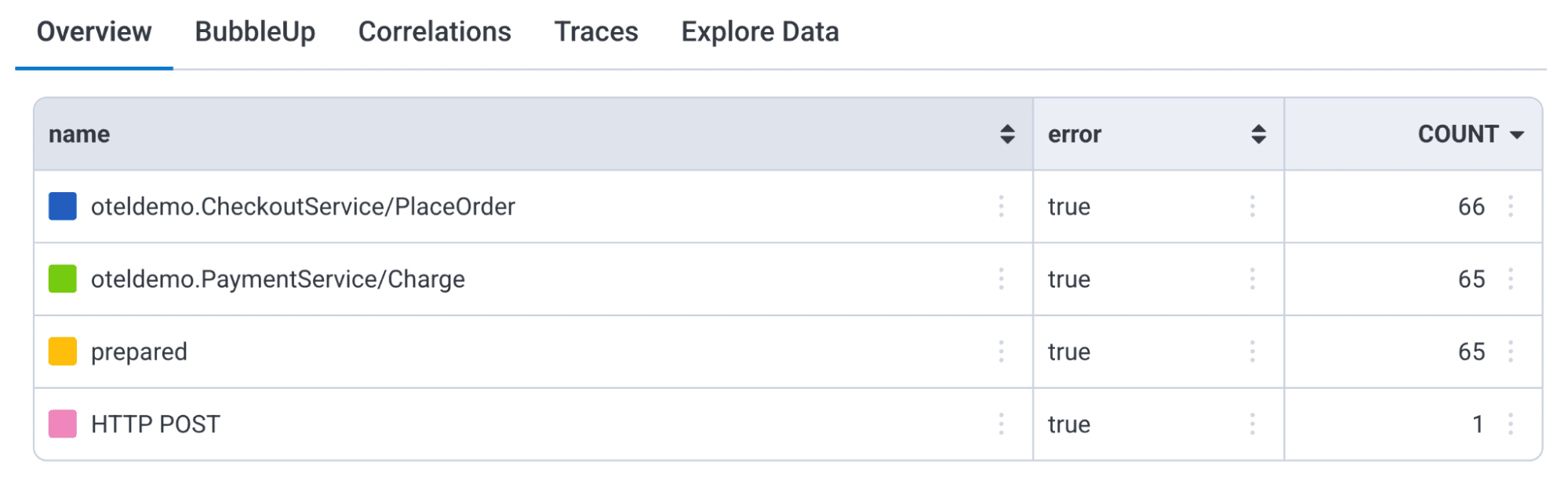
Overview is the "show me the values" view: any visualization or grouping in the query shows up in the table of values below the graph in the Overview tab.
So far, we've located a single event type in our query, one with an error = true condition:

To make an impact that helps both business and our IT team, I want to include the actual exception.message causing the error in the query results.
Where is the exception?
The exception details exist within the error event, recorded against the span. Here's a chunk of the trace view in Honeycomb. That right-most red circle (highlighted in blue) represents the erroring span's exception event:

Our first challenge: the WHERE error = true condition finds the trace span, but the span event is its child.
Let's get the actual error message
I'll use the relational child prefix to add exception.message to the GROUP BY, and, just so I don't include errors that propagated upward but may not have messages of their own, I'll only include errors that contain an exception event:

Right away, we've narrowed down the spans in the checkout service that contain errors with real exceptions.
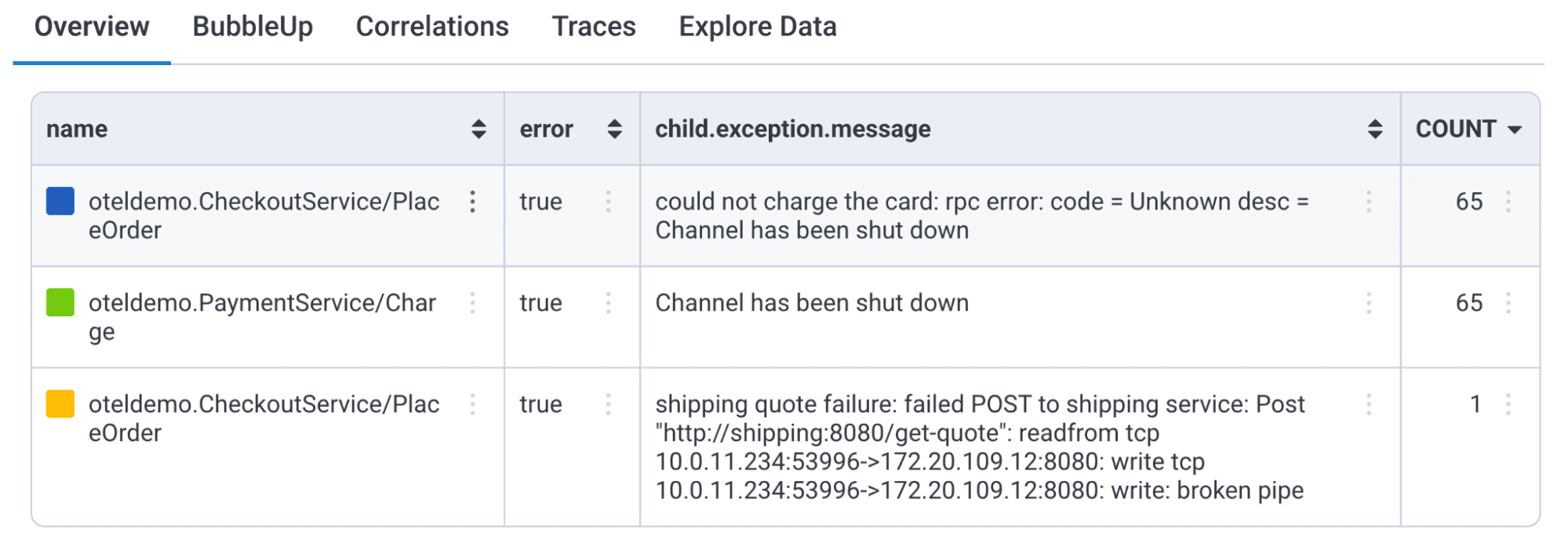
This query now looks at two events: the primary span, and the span's child, an event with the exception details.

Getting top-level information about the trace
I want to see what endpoint people hit when they get this error.
To do that, I'll add another relational query keyword, root, using, root.http.url to the GROUP BY to see the values, and I'll narrow the query to return errors where the root spans that actually contain a root.http.url using the WHERE clause.

I'm starting to get more useful data; I see the endpoint used for each call. In the past 14 days, we've had a few failures around the payment process:
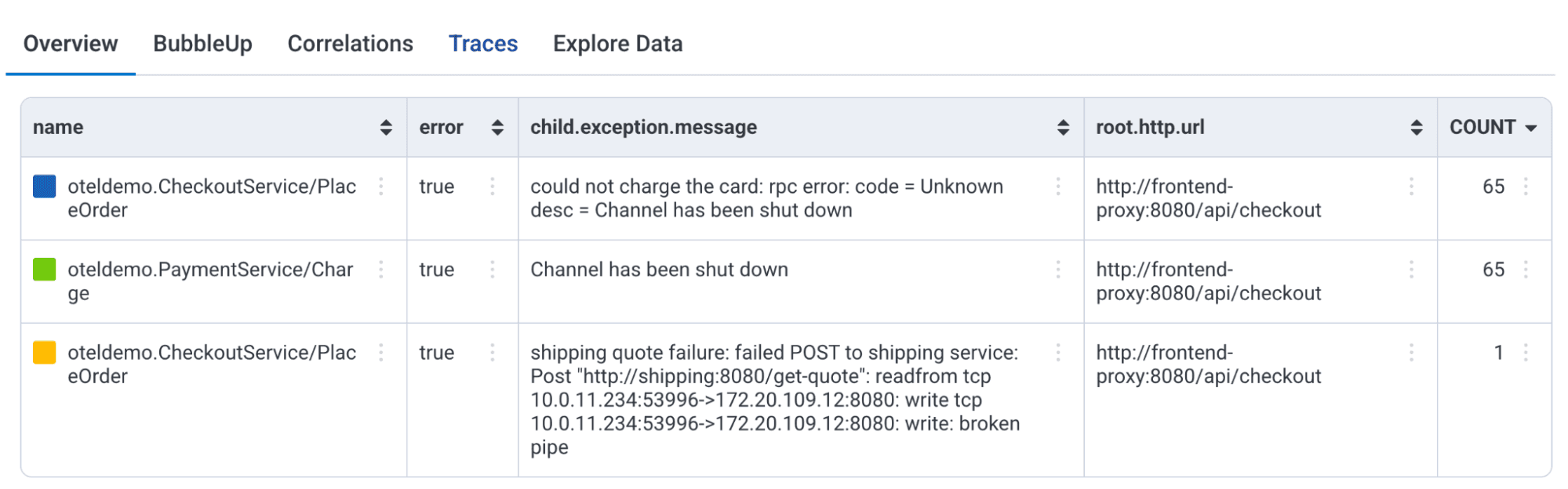
Adding root to the GROUP BY fetches additional trace span attributes from the span that began this trace, which Honeycomb refers to as the root span, even though the primary search fetches spans with error = true.
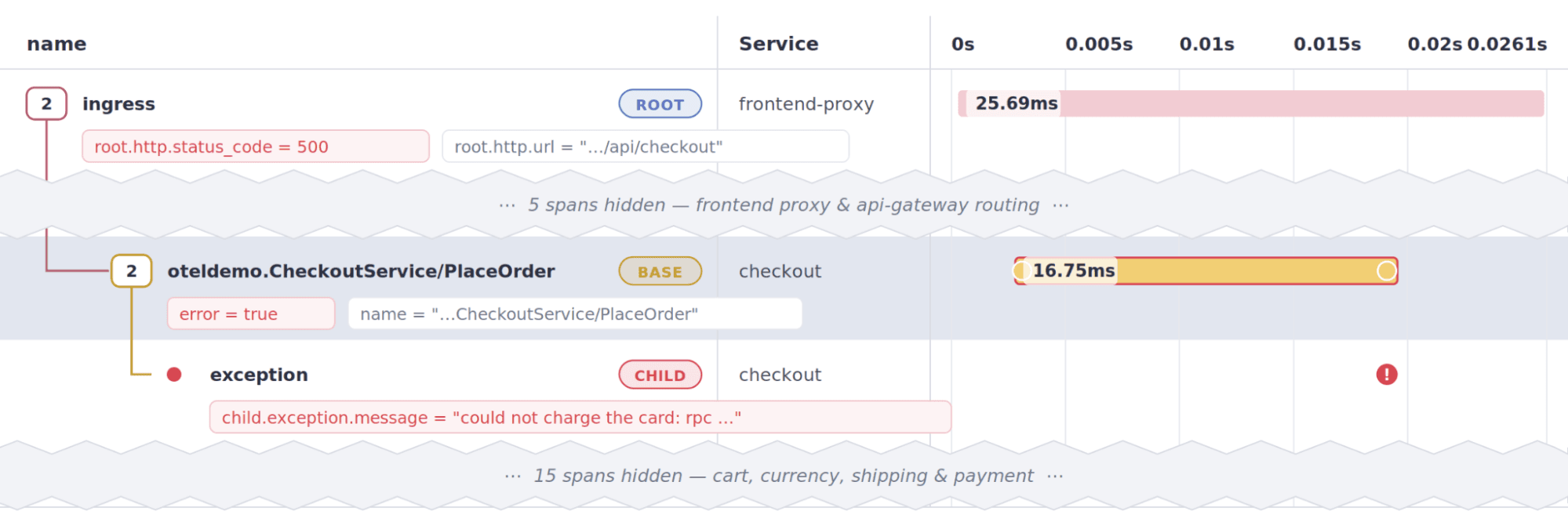
I don't just have to limit myself to the http.url in root, I can add other attributes as well.
More details from the root span
I wonder what the http status code is for these errors. I'll add it to the GROUP BY:

Each of our failures cause http 500 errors:
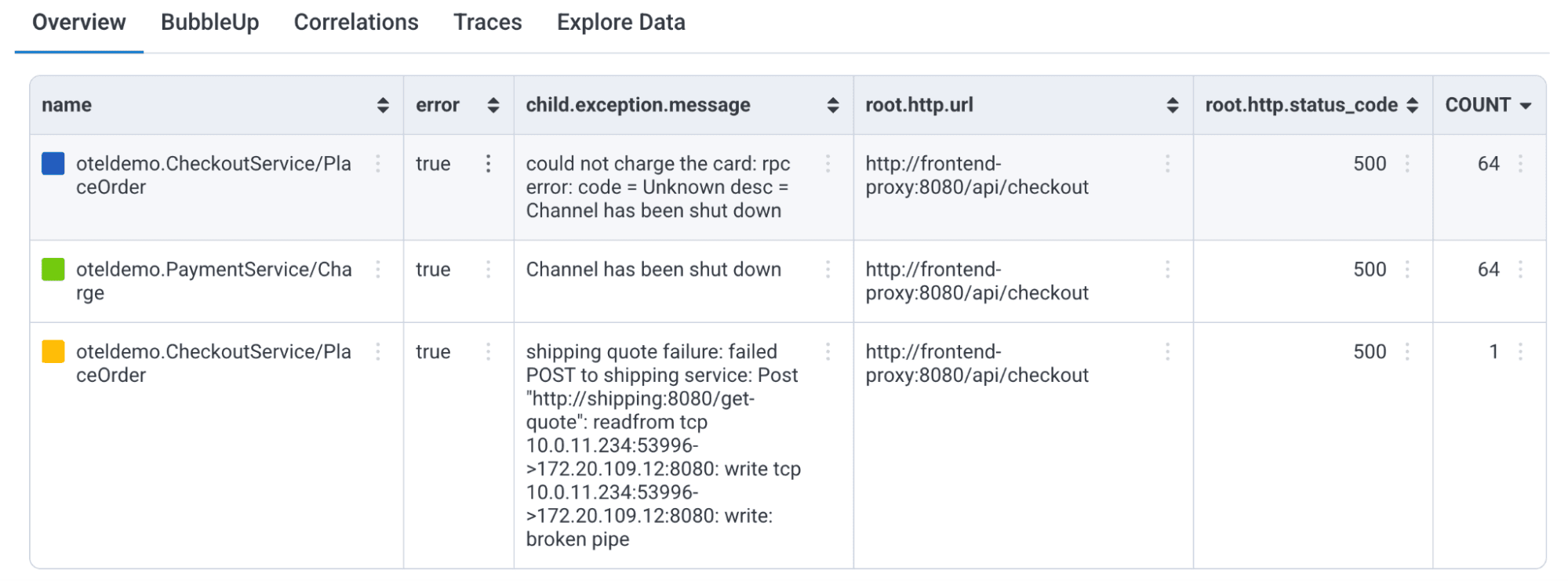
Oh, and the management team wants to focus on operations that leave money on the table. Next, we'll focus on the checkout purchase details.
Pulling the user id from another span
The manager wanted the user's information, so we can quickly contact them and resolve their problems with the site. Elsewhere in the trace, we record an app.user.id attribute. We can find it quickly, regardless of which span it lives in, using Honeycomb's any relational prefix.
Let's try it. We should be able to add any.app.user.id to the GROUP BY, right?

Ok, it looks good. Unfortunately, when I run the query, the any.app.user.id clause gets removed, and a tip appears:
Removed 'any.app.user.id' from the Group By clause. Add a corresponding any filter to the Where clause to group by any fields.
Apparently we can't just use any in the WHERE clause. So, what do we do?
Tip: Identify a span in the WHERE clause to use its values in the GROUP BY clause
You certainly can use the any clause in the GROUP BY, but only if you add the same attribute to a WHERE clause… To fix this here, I'll just add an exists clause to the conditions:

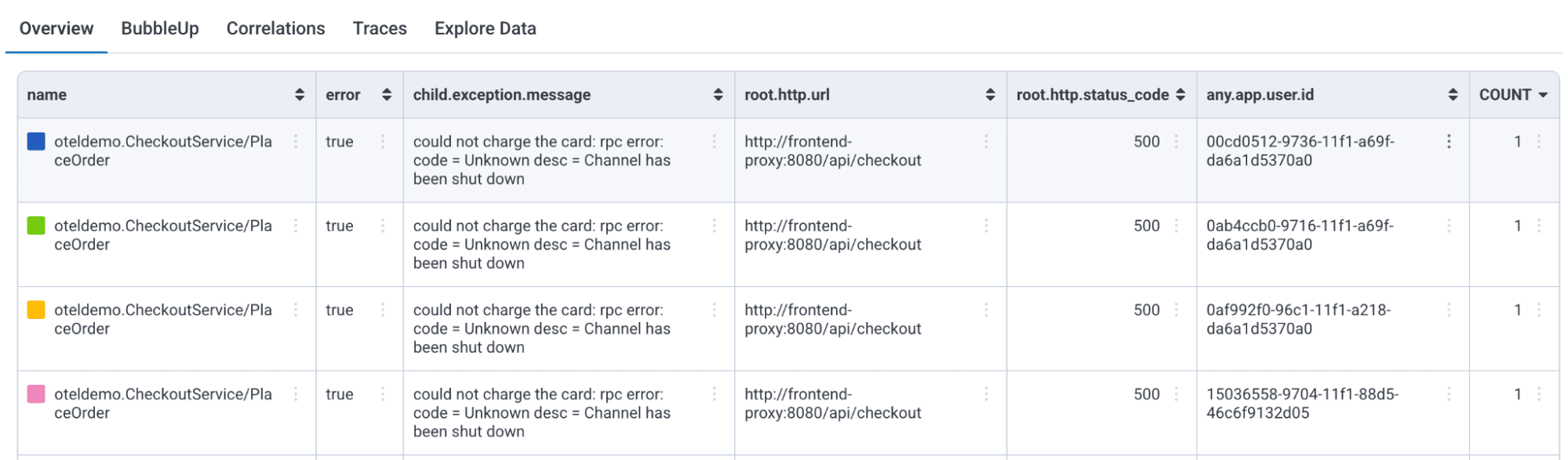
Now, we get the recorded app.user.id that exists somewhere in the trace:
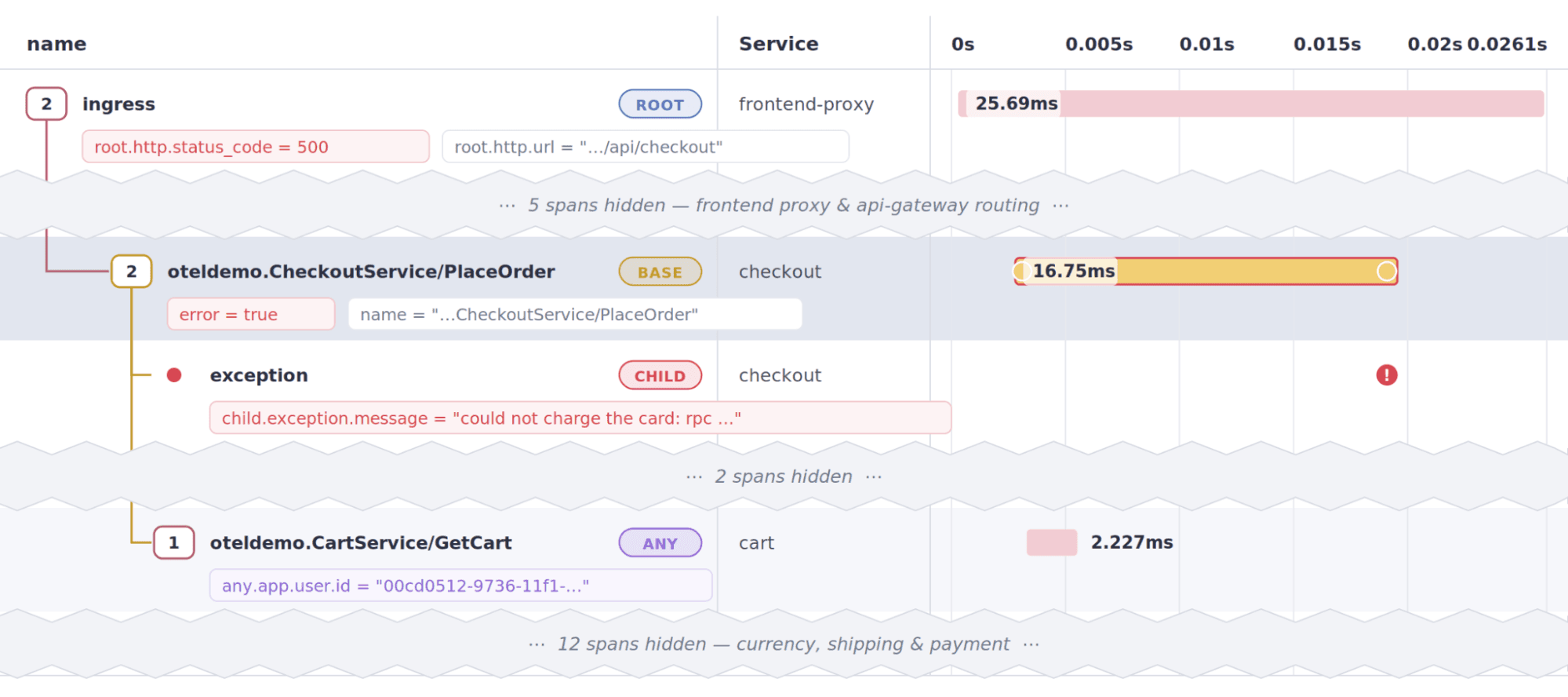
Here are some results:
I also received a warning:
Results match on the first `any` span found per trace and may exclude additional matching spans.
Because Honeycomb has to pick a single qualifying span for the any expression, it will not retrieve more than one here, so it picked the first one it found. In this case, it's fine; if you try this and found it picked the wrong span, qualify it further with other attributes on the any.
Adding other any attributes
Let's try adding another attribute using any. How about app.shipping.amount? It's in another span, surely any should work, right?
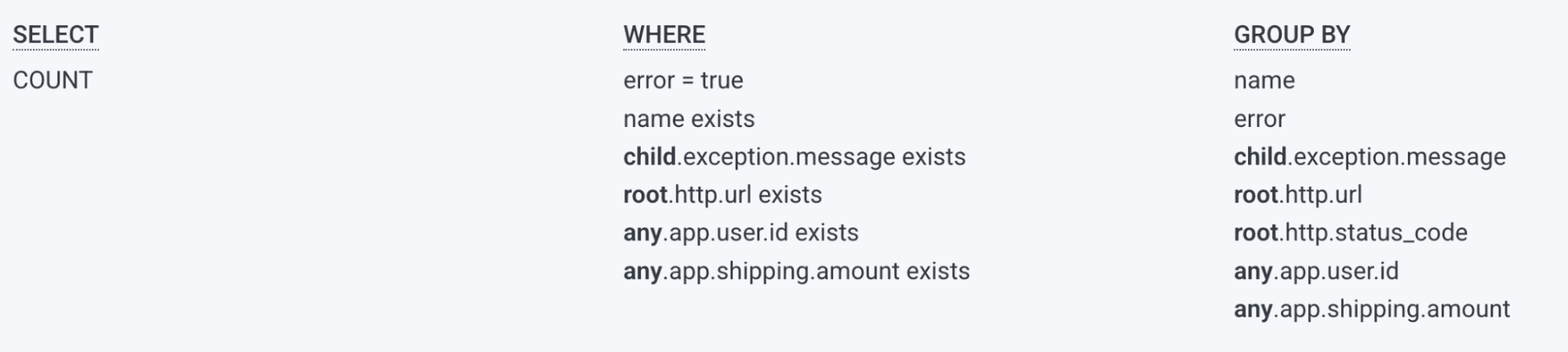
Nope! Now my query is broken, and it found no spans.

What happened?
We didn't find one span with both attributes!
For any to retrieve a span, the attributes in referenced must all match the WHERE criteria against the any.
In my query above, I asked for spans that contained both app.user.id and app.shipping.amount, and no single span containing both of those attributes exists in our data.
Matching on additional spans: more anys
To match on additional spans, Honeycomb provides two additional attributes: any2 and any3. This lets us widen the results to include up to three spans anywhere in the trace with different, even mutually exclusive conditions.
I'll use any2 to against app.shipping.amount from that other trace span, adding it to the WHERE as an existence check, and then grouping by it:
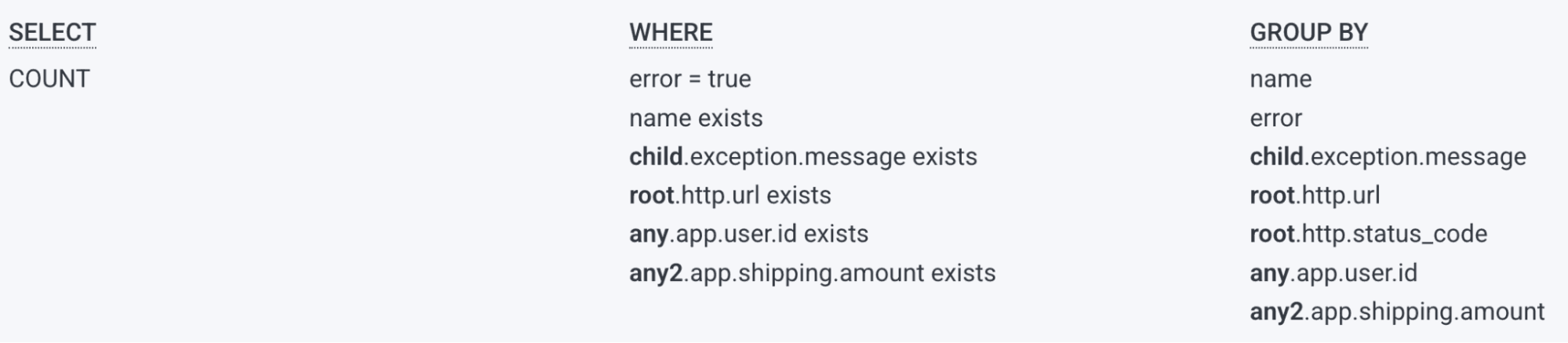
This brings us the additional attribute:
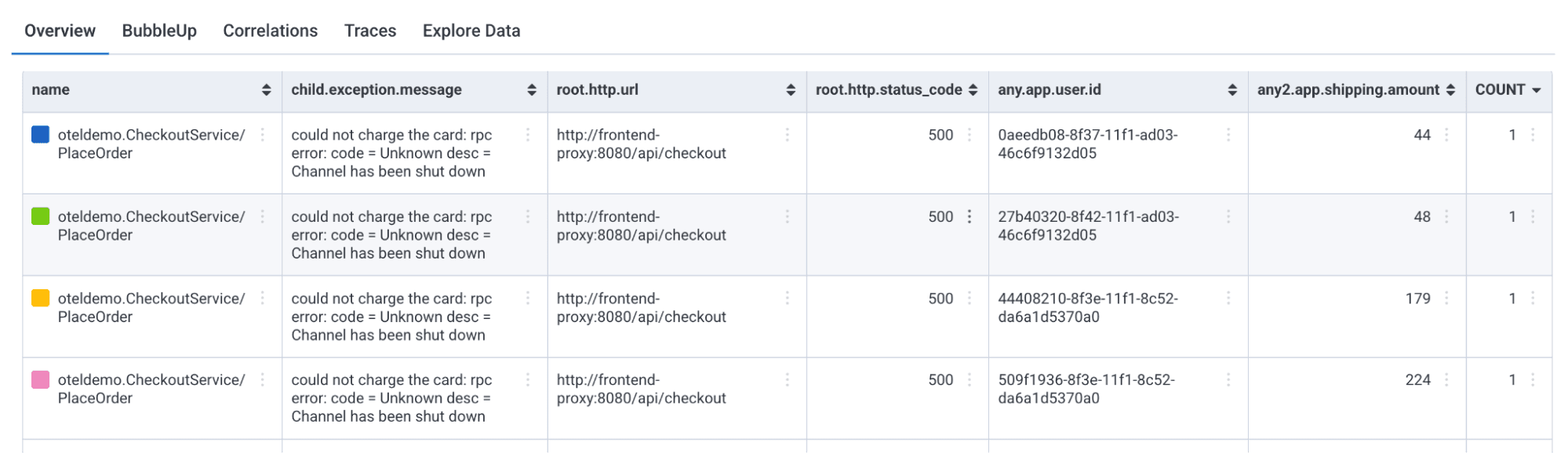
Now I'm looking at more of the trace:
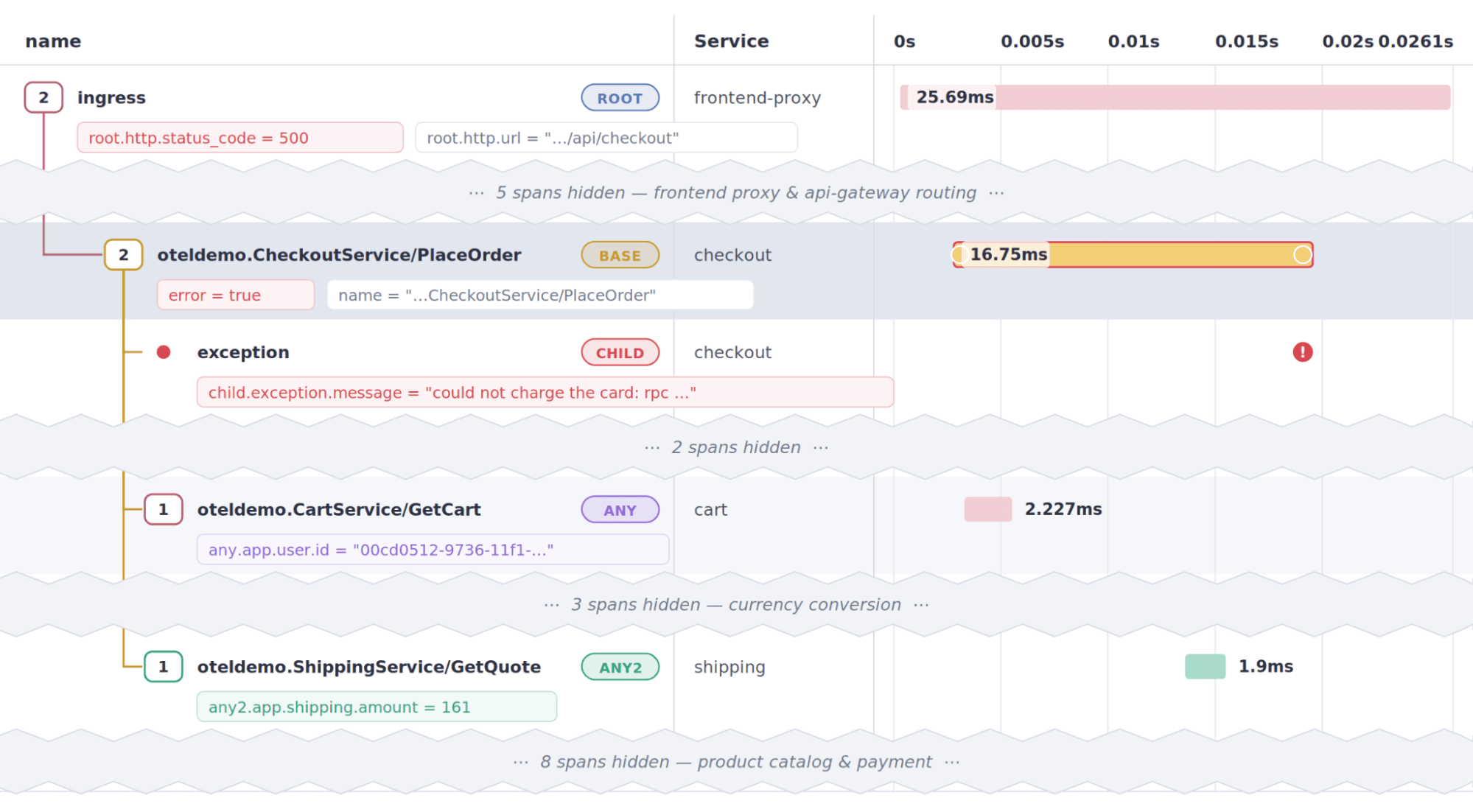
I'm querying up to five spans in the same trace: the primary span with an error, the child exception event, the first span in the same trace containing root.http.url, and the first span in the same trace that has an app.shipping.amount.
How many spans can you reference this way?
But we still don't have a financial amount for these failed payments! As it turns out, another span has that attribute, app.payment.amount, so can we pull yet another span's attributes into our query?
Yes, we can. Honeycomb actually provides three anys: any, any2, and any3. I'll use any3 to pull in the actual payment amount from the span that starts the payment charging process.
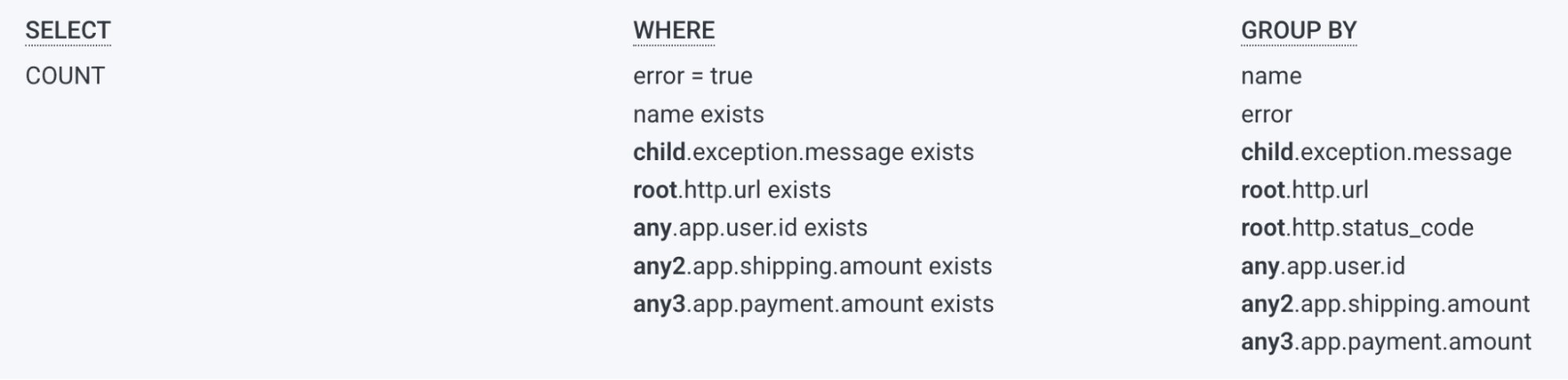
This gives me data across six different spans!
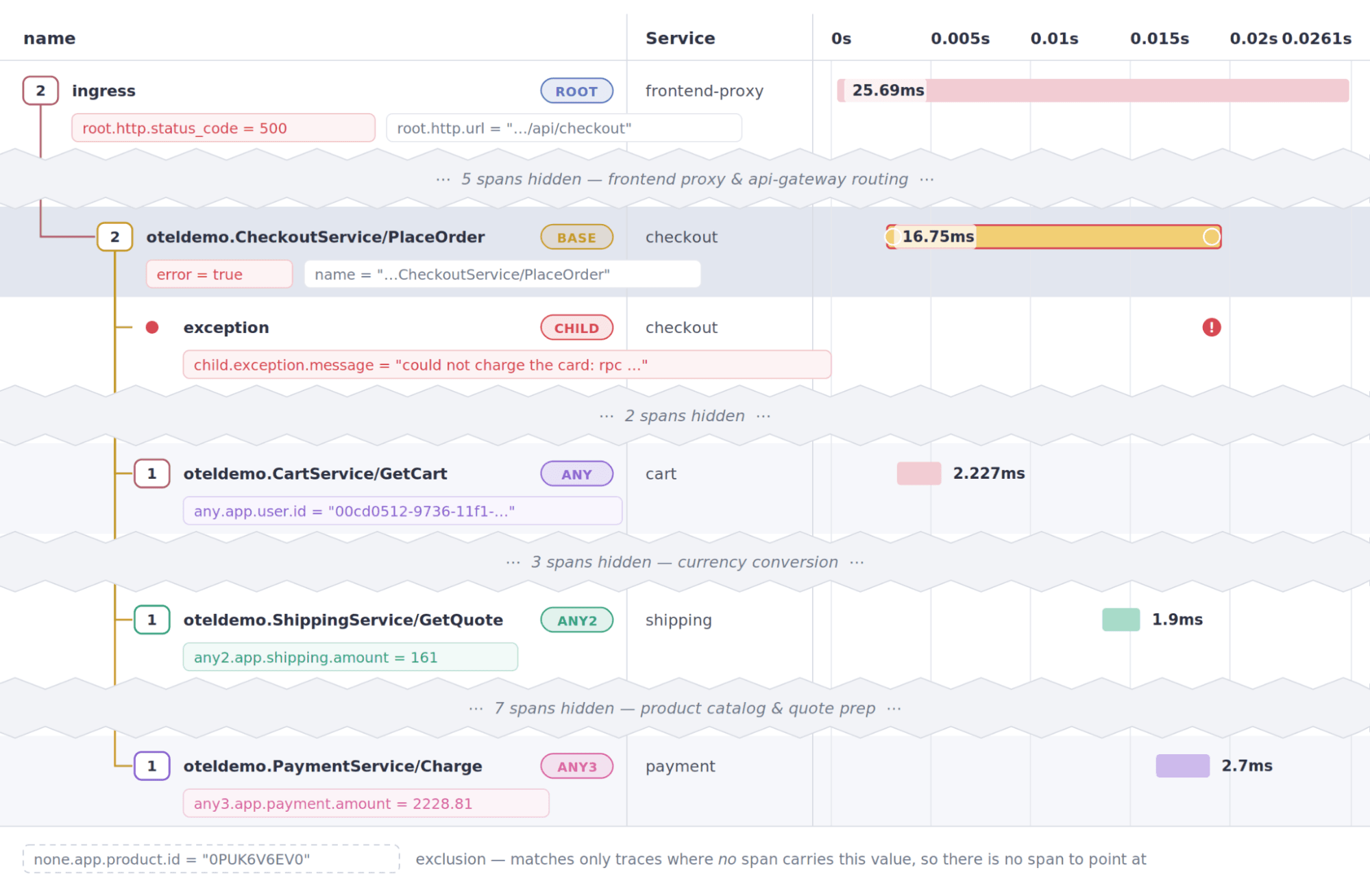
This is straining the ability to display so much data in the Overview tab, but the data can be found and displayed from one query:

I can add this query to my board in table form, and get immediate at-a-glance views of the problems coming from my checkout service.
The none prefix
Use the none prefix to make sure a WHERE clause item doesn't exist anywhere in the traces of the spans you select. For example, to ignore any traces for a specific product, use:
none.app.product.id = 0PUK6V6EV0
Re-running your query, the results won't include traces with errors for that product.
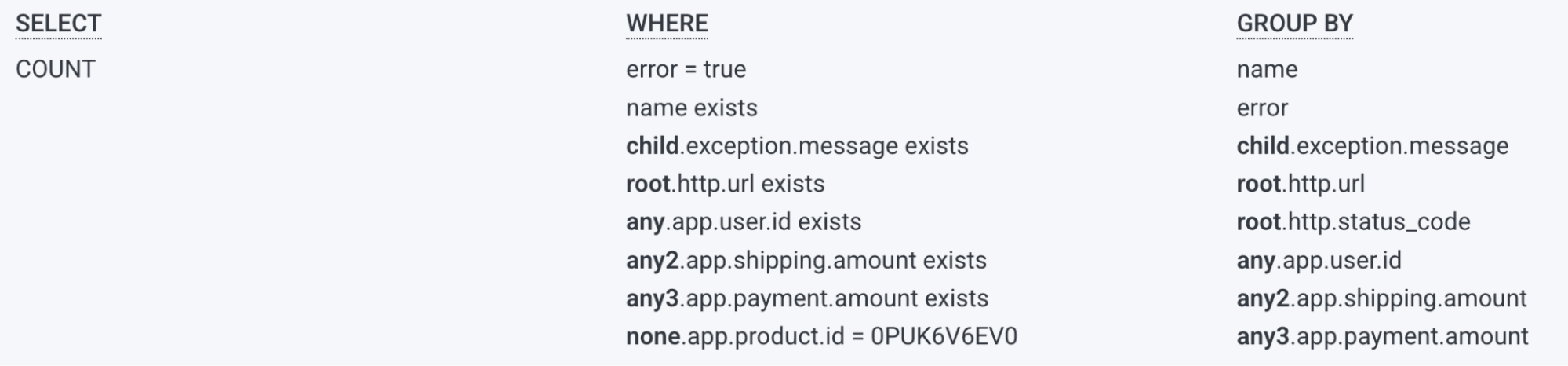
Now, the errors are only reported when one specific product isn't part of the trace with the error.
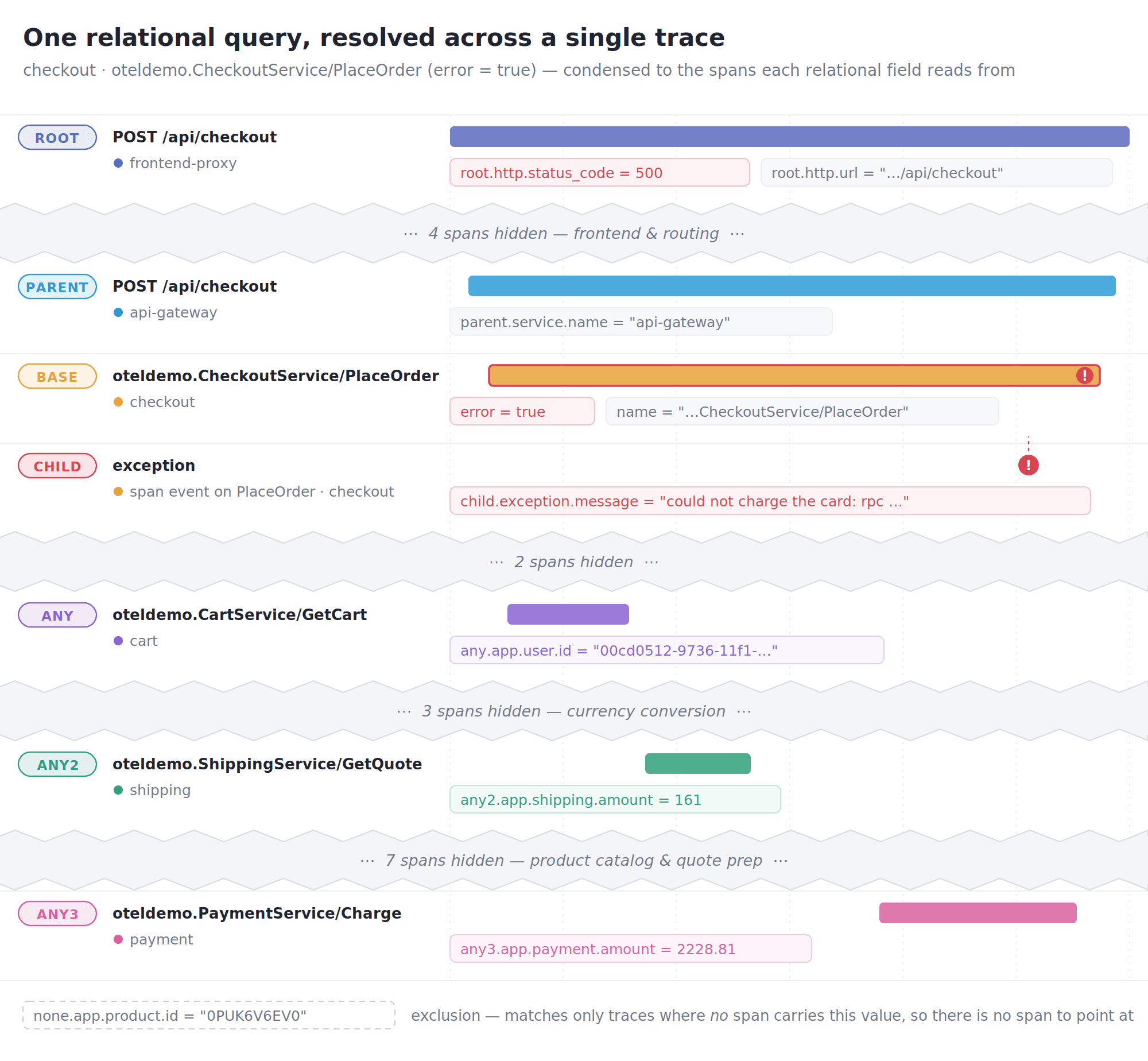
An odd request, but it can be done!
Check exactly where the error happened
Finally, we can restrict our errors to the ones that exist at the API surface layer with the parent keyword.
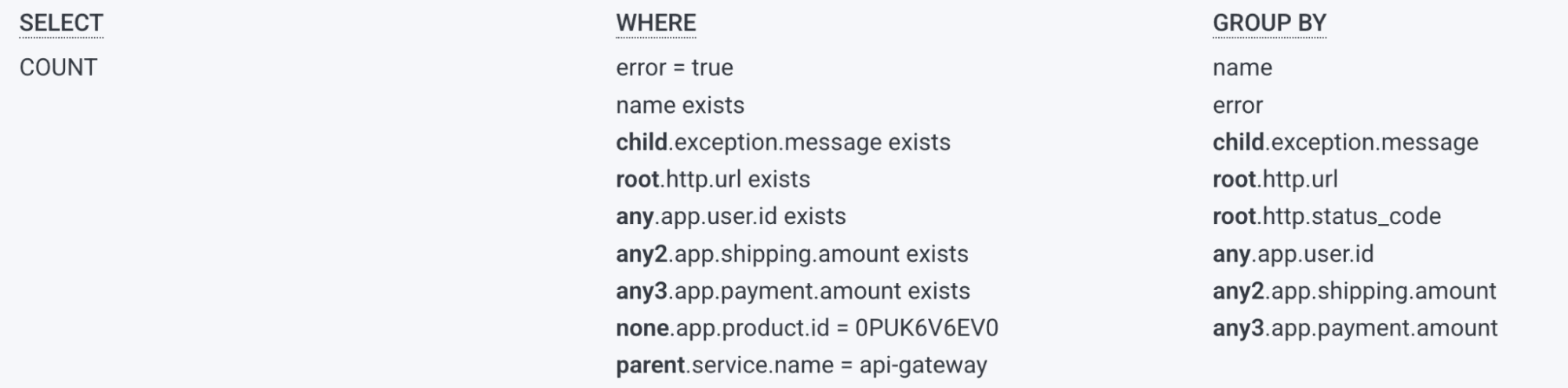
This makes sure the span directly above the erroring span is in the api-gateway service. A partial extract now only shows trace spans from the API gateway.
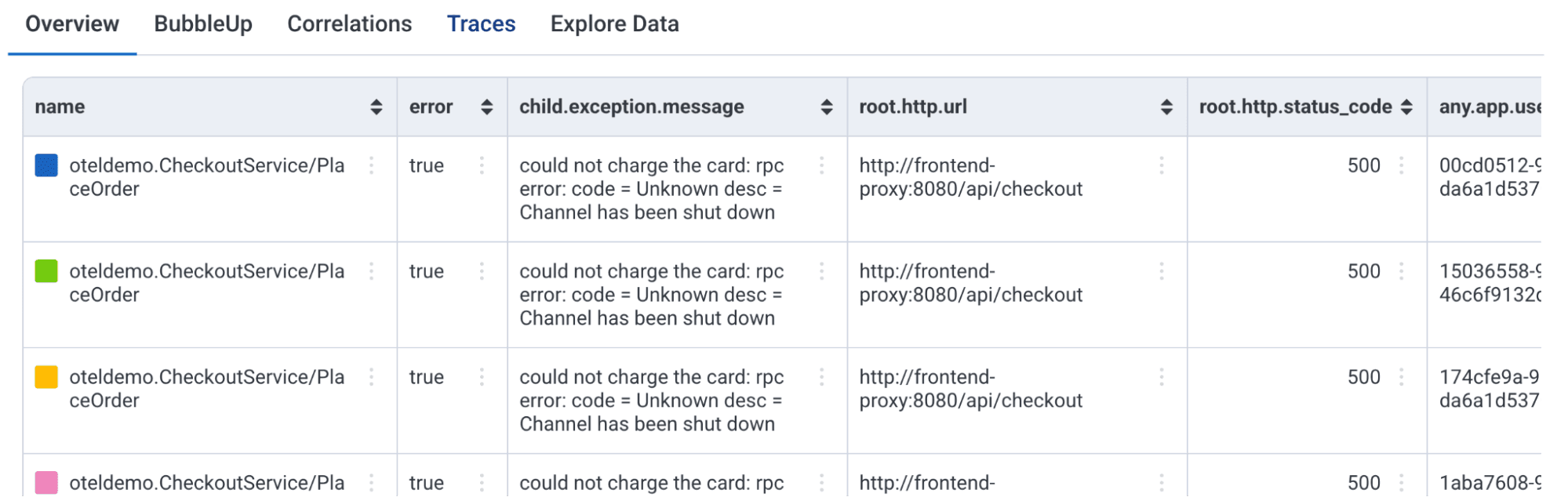
Add trace.trace_id to the GROUP BY to make it easy for anyone to view a trace right from the query results. Our query reach has extended!
Now, we're referencing seven different spans, including the span with the error. Plus, we're excluding any traces involving one specific product with the none expression.
Additional techniques
Here are a few more ideas you can leverage.
Adding attributes to additional spans
if you could put all of these attributes on every span from your code, great! Honeycomb doesn't charge for additional attributes for this reason. Then you can use them in a visualization like HEATMAP or SUM.
Have your agent write the query
Your agent is smart enough to get information across different spans, and will use some of these techniques. If you want to have the agent do something specific, like referencing parent, root, and additional spans, you can use relational query operation language in your request.
Use the query in your favorite agent or another environment
If you've connected your agent to the Honeycomb MCP, you can grab the query URL from Honeycomb, share it in Slack or email, or tell the Honeycomb MCP (or Canvas) to run the query based on it.
Wrap-up
We started off with a challenge: grabbing information across a set of events in a single trace to use in a Honeycomb Board.
Using relational query operators, we were able to connect our results across services from the entire business. We are now able to view attributes from more than just a single service in the Honeycomb Overview tab (and in Board tables), and we can narrow down error details, reported from a specific service, at particular times, from trace spans. Magic!